
Realm, by ACS Technologies, is church management software used by more than 40,000 churches. Church members sign in at OnRealm.org, and there are three easy ways to do it.

How to sign in at OnRealm.org
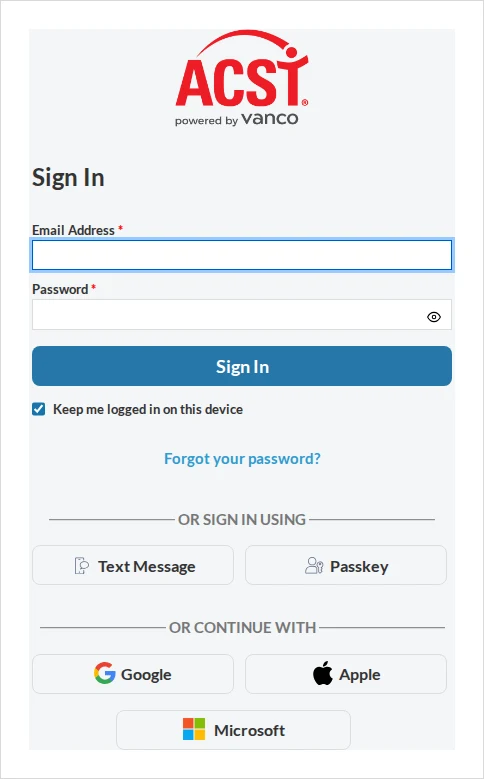
Open your browser and go to the official site, onrealm.org. On the sign-in page, choose one of these methods:
- Text Message (easiest): click Text Message → Send a one-time code. Realm texts a code to your mobile number — enter it and click Verify.
- Passkey: click Passkey and follow your device’s prompt — your fingerprint, face recognition, or screen lock.
- Email & password: enter the email and password you set up for your Realm account.
Realm Connect mobile app
To use Realm on your phone, search your app store for “Realm Connect” (the full app name is Connect – Our Church Community from ACS Technologies). Available on iOS and Android. You sign in the same way — text code, passkey, or email and password.
First time? Realm access starts with an invitation from your church. If you’ve never signed in, ask your church office to send (or resend) your Realm invitation email.
Common problems & fixes
- Didn’t get the text code? Check that your church has your correct mobile number, then request a new code. Codes expire quickly.
- No account yet? You can’t self-register — your church has to invite you. Contact your church office for an invitation.
- Forgot your password? Use the password-reset option on the sign-in page, or switch to the Text Message method instead.
For more, see the official Realm sign-in help from ACS Technologies.
Stay safe: This is an independent how-to guide — we are not affiliated with the platform. Only ever enter your username and password on the platform’s official domain (linked above). We never ask for your login details.





Comments